
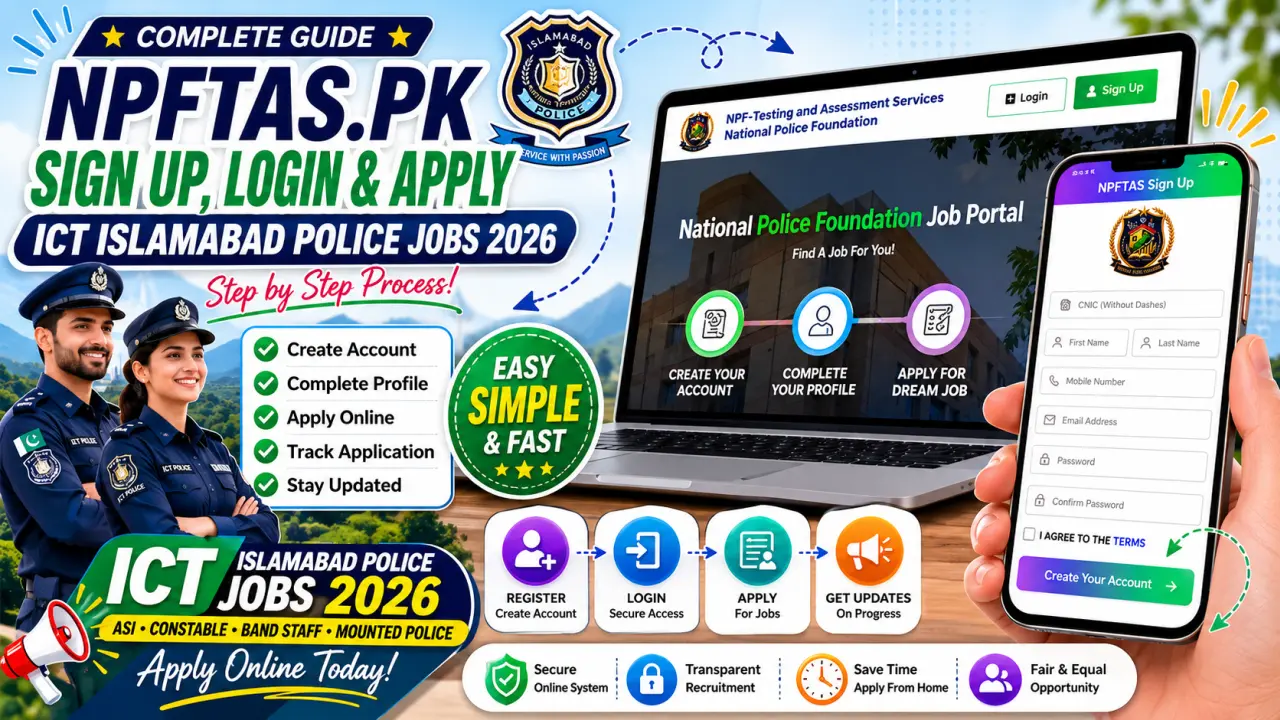
If you want to apply for the latest ICT Islamabad Police Jobs 2026, you must use the official NPF Testing & Assessment Services (NPF-TAS) online portal. This portal allows candidates to create an account, complete their profile, submit applications, and track recruitment updates online. The system is managed by the National Police Foundation (NPF).
In this complete guide, you will learn:
- What is NPFTAS.pk?
- ICT Islamabad Police Jobs 2026 details
- How to register on NPFTAS.pk
- How to log in to your account
- How to apply for Islamabad Police jobs
- Common mistakes to avoid
- FAQs about the portal
What is NPFTAS.pk?
NPFTAS.pk is the official online recruitment portal of NPF Testing & Assessment Services (NPF-TAS). It was created to make recruitment transparent, easy, and fully online for police-related organizations and other government departments. Candidates can create accounts, apply for jobs, download information, and manage their applications through this portal.
The portal follows a simple process:
- Create Your Account
- Complete Your Profile
- Apply for Your Desired Job
This process is clearly displayed on the NPFTAS homepage.
ICT Islamabad Police Jobs 2026 Overview
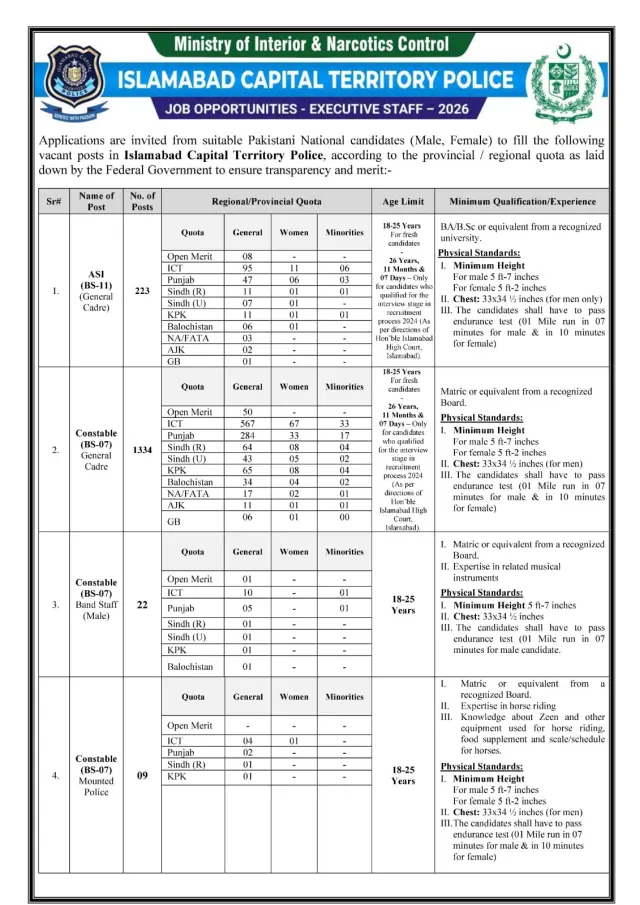
Islamabad Capital Territory Police has announced a large number of vacancies for male and female candidates across Pakistan.
Available Posts
1. Assistant Sub Inspector (ASI) BS-11
- Total Posts: 223
- Qualification: BA/BSc or equivalent
- Age Limit: 18-25 Years
2. Constable BS-07 (General Cadre)
- Total Posts: 1334
- Qualification: Matric
- Age Limit: 18-25 Years
3. Constable Band Staff BS-07
- Total Posts: 22
- Qualification: Matric
- Musical Instrument Skills Required
4. Constable Mounted Police BS-07
- Total Posts: 9
- Qualification: Matric
- Horse Riding Experience Required
Total Vacancies
1,588 Posts
Physical Requirements for ICT Police Jobs
For Male Candidates
- Height: 5 Feet 7 Inches
- Chest: 33″ – 34.5″
- Running Test: 1 Mile in 7 Minutes
For Female Candidates
- Height: 5 Feet 2 Inches
- Running Test: 1 Mile in 10 Minutes
Candidates must meet these requirements before applying.
Why Use NPFTAS Portal?
The National Police Foundation has introduced this system to make recruitment easier and more transparent. Through the portal, applicants can:
- Register online
- Apply from home
- Update profile information
- Track application status
- Receive recruitment updates
- Manage multiple applications through one account
How to Create an Account on NPFTAS.pk
The first step is registration.
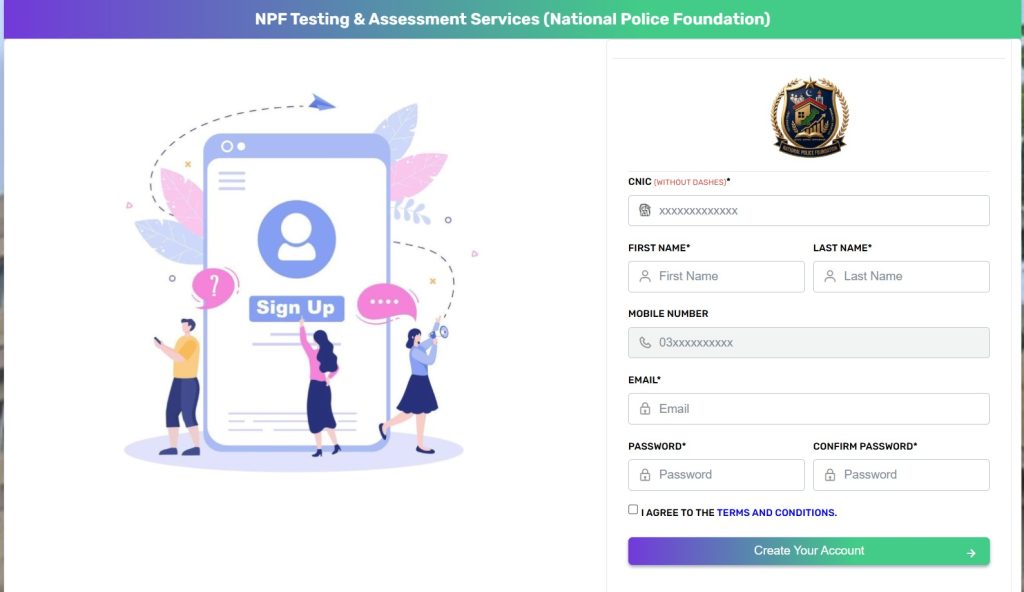
The Sign Up page shown in your screenshots contains the following fields.
Step 1: Open Registration Page
Visit the NPFTAS portal and click the green Sign Up button.
Step 2: Select Candidate Type
Choose:
- Pakistani
- Foreigner
Most applicants should select Pakistani.
Step 3: Enter CNIC Number
Enter your:
CNIC without dashes
Example:
✔ 3520212345671
Do not write:
✘ 35202-1234567-1
Step 4: Enter Your Name
Provide:
- First Name
- Last Name
Enter the same name that appears on your CNIC.
Step 5: Enter Mobile Number
Provide an active mobile number.
Example:
03XXXXXXXXX
Make sure the number remains active during recruitment.
Step 6: Enter Email Address
Provide a valid email address because important updates may be sent to it.
Example:
Step 7: Create Password
Create a strong password.
Example:
- Use letters
- Use numbers
- Use special characters
Avoid weak passwords like:
12345678
password123
Step 8: Confirm Password
Re-enter the same password.
Step 9: Accept Terms & Conditions
Tick:
I Agree To The Terms and Conditions
Step 10: Create Account
Click:
Create Your Account
After successful registration, your account will be created.
How to Login to NPFTAS.pk
If you already have an account, you can sign in easily.
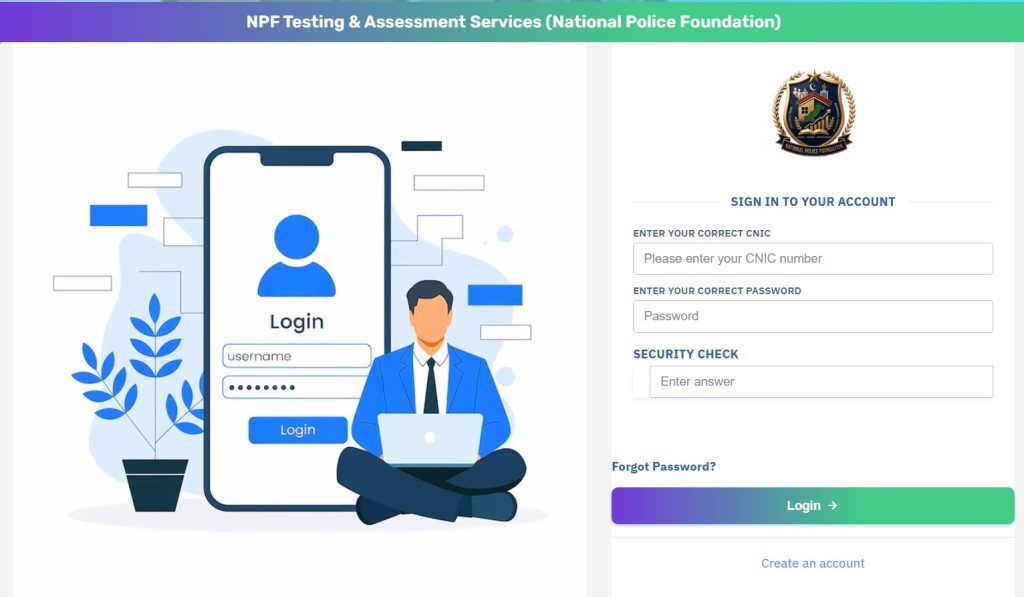
The Login page shown in your screenshots requires CNIC and password.
Step 1: Open Login Page
Click the Login button.
Step 2: Enter CNIC
Type your CNIC number.
Example:
3520212345671
Step 3: Enter Password
Enter the password you created during registration.
Step 4: Security Check
Some applications may require a security verification answer before login.
Step 5: Click Login
Press the Login button.
You will be redirected to your candidate dashboard.
Forgot Password? Here Is the Solution
If you cannot remember your password:
- Open Login Page
- Click Forgot Password
- Enter required information
- Follow verification instructions
- Create a new password
After resetting, use the new password to access your account.
How to Complete Your Profile
After registration, log in and complete your profile carefully.
Usually you will need to provide:
Personal Information
- CNIC
- Name
- Father Name
- Gender
- Date of Birth
- Domicile
Contact Information
- Mobile Number
- Email Address
- Postal Address
Educational Information
- Matric Details
- Intermediate Details
- Bachelor Degree Details (for ASI applicants)
Experience Details
If applicable, provide experience information.
How to Apply for ICT Islamabad Police Jobs
After profile completion, follow these steps.
Step 1: Login
Sign in to your NPFTAS account.
Step 2: Open Available Jobs
Go to:
Open Applications
The portal displays currently available vacancies.
Step 3: Select Desired Post
Choose:
- ASI
- Constable
- Band Staff
- Mounted Police
depending on your eligibility.
Step 4: Read Eligibility
Before applying, check:
- Qualification
- Age
- Physical Standards
- Domicile Quota
Step 5: Click Apply
Press:
Apply Now
Step 6: Verify Information
Review:
- Name
- CNIC
- Education
- Contact Information
Step 7: Submit Application
Submit the form after confirming all information.
Important Documents Required
Keep these documents ready:
- CNIC
- Domicile
- Educational Certificates
- Recent Photograph
- Experience Certificates (if required)
Having documents ready can save time during application submission.
Common Mistakes to Avoid
Many candidates make simple mistakes that can create problems later.
Avoid these errors:
Wrong CNIC Number
Always double-check CNIC digits.
Wrong Mobile Number
Use your own active number.
Invalid Email Address
Provide a working email account.
Incomplete Profile
Fill every required field.
Applying for Wrong Post
Read eligibility criteria carefully before applying.
Missing Deadline
Apply before the closing date.
Benefits of Applying Through NPFTAS
The online system offers many advantages.
Easy Registration
Candidates can create accounts within minutes.
Online Application
No need to visit offices repeatedly.
Better Transparency
Applications are processed digitally.
Faster Communication
Updates can be shared quickly.
Application Tracking
Candidates can monitor their recruitment process online.
NPFTAS Help and Contact Information
According to the portal, candidates can contact the help desk for assistance.
Address: NPF Plaza, G-10/4, Islamabad
Phone: 051-8466800
Email: info@npftas.pk
Final Words
The NPFTAS.pk Job Portal is the official online recruitment system used by the National Police Foundation for various government recruitment projects, including ICT Islamabad Police Jobs 2026. Through this portal, candidates can create accounts, complete profiles, apply online, and manage their recruitment process from home.
For Islamabad Police Jobs 2026, candidates can apply for ASI, Constable, Band Staff, and Mounted Police vacancies according to their qualifications and eligibility. The key to a successful application is to create your account correctly, complete your profile carefully, and submit your application before the deadline.
FAQs
What is NPFTAS.pk?
NPFTAS.pk is the official NPF Testing & Assessment Services recruitment portal used for online job applications.
Can I apply for Islamabad Police Jobs without registration?
No. You must first create an account on the NPFTAS portal before applying.
What login details are required?
You need your CNIC number and password to log in.
What is the qualification for ASI Jobs?
Candidates must have a BA, BSc, or equivalent degree from a recognized university.
What is the qualification for Constable Jobs?
Candidates must have Matric or equivalent education.
Can female candidates apply?
Yes. Female candidates can apply according to the quota and eligibility criteria mentioned in the advertisement.
How can I recover my password?
Use the Forgot Password option available on the login page

